One-to-One and One-To-Many Relationships : Code-Along (CodeGrade)
Learning Goals
- Use Flask-SQLAlchemy to join models with one-to-one and one-to-many relationships.
- Repo.
Introduction
We already know that we can build SQL tables such that they associate with one another via primary keys and foreign keys. We've also seen how to write SQL queries that join two tables to combine rows that are related based on foreign keys.
In this lesson, we'll explore how Flask-SQLAlchemy makes it easy to establish and use relationships between models, without having to write SQL. We'll implement a one-to-many and a one-to-one relationship between models.
Flask-SQLAlchemy uses a ForeignKey column to constrain and join data models, a relationship() method that allows one model to access its related model, and a back_populates property to establish a bi-directional relationship between models such that changes on one side of the relationship are propagated to the other side. This makes the syntax for accessing related models and creating join tables very simple.
Setup
This lesson is a code-along, so fork and clone the repo.
Run pipenv install to install the dependencies and pipenv shell to enter your virtual environment before running your code.
$ pipenv install
$ pipenv shell
Change into the server directory and configure the FLASK_APP and FLASK_RUN_PORT environment variables:
$ cd server
$ export FLASK_APP=app.py
$ export FLASK_RUN_PORT=5555
The file server/models.py defines 3 models named Employee, Review, and Onboarding. Relationships have not yet been established between the models. You'll do that in this lesson.
from flask_sqlalchemy import SQLAlchemy
from sqlalchemy import MetaData

metadata = MetaData(naming_convention={
    "fk": "fk_%(table_name)s_%(column_0_name)s_%(referred_table_name)s",
})

db = SQLAlchemy(metadata=metadata)

class Employee(db.Model):
    __tablename__ = 'employees'

    id = db.Column(db.Integer, primary_key=True)
    name = db.Column(db.String)
    hire_date = db.Column(db.Date)

    def __repr__(self):
        return f'<Employee {self.id}, {self.name}, {self.hire_date}>'

class Onboarding(db.Model):
    __tablename__ = 'onboardings'

    id = db.Column(db.Integer, primary_key=True)
    orientation = db.Column(db.DateTime)
    forms_complete = db.Column(db.Boolean, default=False)

    def __repr__(self):
        return f'<Onboarding {self.id}, {self.orientation}, {self.forms_complete}>'

class Review(db.Model):
    __tablename__ = 'reviews'

    id = db.Column(db.Integer, primary_key=True)
    year = db.Column(db.Integer)
    summary = db.Column(db.String)

    def __repr__(self):
        return f'<Review {self.id}, {self.year}, {self.summary}>'
Employeehas anameandhire_date.- An employee receives a new performance review every year.
Reviewstores theyearand a performancesummary. - An employee goes through an onboarding process as a new hire.
Onboardingstores the date and time of the employee'sorientationsession, along with a boolean namedforms_completethat indicates whether all required forms have been filled out. While the onboarding information could be stored with theEmployeemodel directly, it is seldom used and thus abstracted into a separate model.
Run the following commands to create and seed the three tables with sample data.
$ flask db init
$ flask db migrate -m "initial migration"
$ flask db upgrade head
$ python seed.py
Confirm the database server/instance/app.db has the three tables with the initial seed data using a VS Code extension such as SQLite Viewer:
Relational Data Model
Let's update the initial data model to add two relationships.

We will add a one-to-many relationship between Employee and Review. A one-to-many relationship is also referred to as a has many/belongs to relationship.
Employee -< Review- An employee has many reviews.
- A review belongs to one employee.
We will add a one-to-one relationship between Employee and Onboarding. A one-to-one relationship is also referred to as a has one/belongs to relationship.
Employee -- Onboarding- An employee has one onboarding.
- An onboarding belongs to one employee.
One-To-Many Relationship
We'll implement the one-to-many relationship first since it is more common than a one-to-one relationship.
The concept of Single Source Of Truth (SSOT) states we should design applications to avoid redundancy. In terms of database design, we want to store a relationship between two entities in just one place. We do this to avoid issues that arise when redundant data is not updated in a consistent manner.
For a one-to-many relationship, the model on the "many" side is responsible for storing the relationship. Why? Beside each object on the "many" side is related to just one entity on the "one" side, thus it only needs to store a single value to maintain the relationship.

While we store the relationship in just one place in the database, we often need to access and update both sides of the relationship within our application. We will establish a bidirectional relationship between two models (one-to-many and many-to-one) by making the following updates:
- Add a foreign key column to the model on the "many" or "belongs to" side to store the one-to-many relationship.
- Add a relationship to the model on the "one" side to reference a list of associated objects from the "many" side.
- Add a reciprocal relationship to the model on the "many" side and connect both relationships using the
back_populatesproperty.
Normally we will make the three changes to the data model all together in one step. However, this lesson performs them one at a time to clarify what each update does to the data model.
Update #1: Add a foreign key column to the Review model to store the one-to-many relationship.
An employee has many reviews. A review belongs to one employee.
The initial schema did not include a foreign key reference to an employee in the reviews table. Each row contains an annual performance review for one employee, but the data does not tell us which employee the review is for!
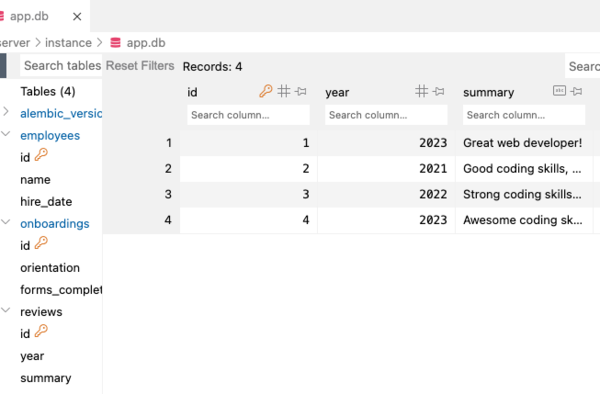
Since Review is on the many or belongs to side, it is responsible for storing the relationship. Edit the Review model to add the attribute employee_id to store a foreign key column:
class Review(db.Model):
    __tablename__ = 'reviews'

    id = db.Column(db.Integer, primary_key=True)
    year = db.Column(db.Integer)
    summary = db.Column(db.String)
    # Foreign key stores the Employee id
    employee_id = db.Column(db.Integer, db.ForeignKey('employees.id'))

    def __repr__(self):
        return f'<Review {self.id}, {self.year}, {self.summary}>'
Make sure you save models.py before proceeding.
A new column represents a schema change, which means we need to perform a migration. Type the following in the console:
$ flask db migrate -m "add foreign key to Review"
You should see a new migration script in servers/migrations/versions:
├── migrations
│   ├── README
│   ├── alembic.ini
│   ├── env.py
│   ├── script.py.mako
│   └── versions
│       ├── 13265153dbc6_initial_migration.py
│       └── 57e0d9cfbe10_add_foreign_key_to_review.py
Open the new migration script and confirm the upgrade() function alters the reviews table to add the new foreign key column.
Run the migration to add the foreign key by typing the following:
$ flask db upgrade head
After migration, the reviews table should be updated with a new foreign key column named employee_id. Confirm the new column exists (you may need to hit the refresh icon).
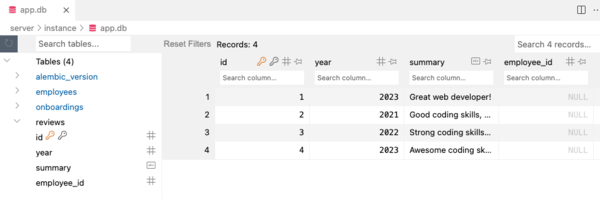
The table has the new column employee_id with null values. You can use Flask shell to confirm the employee_id attribute exists but does not contain a value.
$ flask shell
>>> review1 = Review.query.filter_by(id = 1).first()
>>> review1.employee_id
None
>>> exit()
$
Let's assign values to the employee_id column. Edit seed.py to pass an employee id as a third argument into each Review constructor call. The first review is for employee 1 (Uri), while the other three reviews are for employee 2 (Tristan). NOTE: In a subsequent step we will pass an employee reference rather than an integer for the id.
# 1..many relationship between Employee and Review
    uri_2023 = Review(year=2023,
                    summary="Great web developer!",
                    employee_id=1)
    tristan_2021 = Review(year=2021,
                        summary="Good coding skills, often late to work",
                        employee_id=2)
    tristan_2022 = Review(year=2022,
                        summary="Strong coding skills, takes long lunches",
                        employee_id=2)
    tristan_2023 = Review(year=2023,
                        summary="Awesome coding skills, dedicated worker",
                        employee_id=2)
    db.session.add_all([uri_2023, tristan_2021, tristan_2022, tristan_2023])
    db.session.commit()
Re-seed the database.
$ python seed.py
Refresh the reviews table to confirm an employee id has been added to each row.

You can also use the Flask shell to confirm the employee id.
$ flask shell
>>> review1 = Review.query.filter_by(id = 1).first()
>>> review1.employee_id
1
>>> exit()
$
Update #2: Add a relationship to the Employee model to reference a list of Review objects.
Employee is on the "one" side of the relationship. Following the principle of SSOT, we should not store an employee's reviews in the employees table. Rather, the reviews can be computed by querying the reviews table for rows associated with the current employee instance. Luckily, we can achieve this without writing any SQL! SQLAlchemy's Relationship class defines an object that can store a single item or a list of items that correspond to a related database table. The SQLAlchemy method relationship() creates an instance of Relationship that can be used to access the related items.
Edit Employee to add a new property named reviews assigned to a new relationship:
We can now easily get a list of reviews for an employee using the reviews property. Test this out with the Flask shell:
$ flask shell
>>> uri = Employee.query.filter_by(id = 1).first()
>>> uri.reviews
[<Review 1, 2023, Great web developer!>]
>>> tristan = Employee.query.filter_by(id = 2).first()
>>> tristan.reviews
[<Review 2, 2021, Good coding skills, often late to work>, <Review 3, 2022, Strong coding skills, takes long lunches>, <Review 4, 2023, Awesome coding skills, dedicated worker>]
>>>
It is important to note that the relationship() construct does not alter the employees or reviews tables. The one-to-many relationship is still stored as a foreign key in the reviews table. Since the schema remains the same, we don't need to perform a migration.
Update #3: Add a reciprocal relationship to the Review model
We will to establish a bidirectional relationship (one-to-many and many-to-one) by adding a relationship() construct to the Review model. We will connect both relationships by assigning a mutual back_populates parameter:
Edit Employee to add the back_populates parameter as well:
Some things to note:
Employeeuses the plural namereviewssince the relationship stores a list of associated reviews.Reviewused the singular nameemployeesince the relationship stores a single associated employee.- The value assigned to the
back_populatesparameter for each relationship is the property name assigned to the other relationship.
Now we can get the reviews for an employee, as well as the employee for a review:
$ flask shell
>>> from models import db, Employee, Review
>>> tristan = Employee.query.filter_by(id = 2).first()
>>> #Get list of reviews for an employee
>>> tristan.reviews
[<Review 2, 2021, Good coding skills, often late to work>, <Review 3, 2022, Strong coding skills, takes long lunches>, <Review 4, 2023, Awesome coding skills, dedicated worker>]
>>> tristan_2021 = Review.query.filter_by(id = 2).first()
>>> #Get employee for a review
>>> tristan_2021.employee
<Employee 2, Tristan Tal, 2020-01-30>
Note that we can still reference the foreign key column employee_id of a review:
>>> #Get employee_id for a review
>>> tristan_2021.employee_id
2
Let's update seed.py to establish the relationship using the employee attribute rather than employee_id. Notice we pass an object reference rather than an integer into the constructor call, which makes the code more object-oriented and less SQL-ish.
# 1..many relationship between Employee and Review
uri_2023 = Review(year=2023,
                summary="Great web developer!",
                employee=uri)
tristan_2021 = Review(year=2021,
                    summary="Good coding skills, often late to work",
                    employee=tristan)
tristan_2022 = Review(year=2022,
                    summary="Strong coding skills, takes long lunches",
                    employee=tristan)
tristan_2023 = Review(year=2023,
                    summary="Awesome coding skills, dedicated worker",
                    employee=tristan)
db.session.add_all([uri_2023, tristan_2021, tristan_2022, tristan_2023])
db.session.commit()
Now you should re-seed the database:
$ python seed.py
The reviews table should look the same as before, with the employee_id foreign key column holding the integer id of the associated employee.
back_populates versus backref
Sometimes you will see examples of code where only one model is defined with relationship() and the method is passed a backref parameter rather than back_populates.
For example, we could remove the explicit relationship from Review, and modify the relationship in Employee to use a backref parameter(but don't do this). The backref parameter will result in a relationship() being added to Review automatically.
However, backref is considered legacy, and using back_populates with explicit relationship() constructs is generally recommended.
One-to-One Relationship
A one-to-one relationship is implemented in a similar manner as a one-to-many.
A one-to-one relationship is also called a "has one/belongs to" relationship. With a one-to-one relationship, you will pick one model to be on the "belongs to" side of the relationship (you can pick either model). The model on the "belongs to" side will store the foreign key.
Let's pick the Onboarding model to be on the belongs to side of the relationship.

We'll need to make the following updates to the data model:
- Add a foreign key column to the model on the "belongs to" side to store the one-to-one relationship.
- Add a relationship with
uselist=Falseto the model on the "has one" side to reference the associated object on the "belongs to" side. - Add a reciprocal relationship to the model on the "belongs to" side and connect both relationships using the
back_populatesproperty.
Since Onboarding is on the "belongs to" side, update the model to add a foreign key column and a relationship:
Employee is on the "has one" side. You need to specify the uselist parameter in the "has one" side of a one-to-one relationship. Update the Employee model to add a relationship with the parameter uselist=False. This ensures the relationship maps to a single related object rather than a list.
Some things to note:
Onboardinguses the singular nameemployeesince the relationship holds a singleEmployeeinstance.Employeeuses the single nameonboardingsince the relationship holds a singleOnboardinginstance.- The value assigned to the
back_populatesparameter for each relationship is the property name assigned to the other relationship.
We added a foreign key column to the Onboarding model, thus we need to perform a migration to update the database schema. Make sure you save models.py, then enter the following:
$ flask db migrate -m "add foreign key to onboarding"
$ flask db upgrade head
The onboardings table should now have a new column employee_id.
Update seed.py to pass an additional argument employee to each Onboarding constructor call as shown:
# 1..1 relationship between Employee and Onboarding

uri_onboarding = Onboarding(
    orientation=datetime.datetime(2023, 3, 27),
    employee=uri)

tristan_onboarding = Onboarding(
    orientation=datetime.datetime(2020, 1, 20, 14, 30),
    forms_complete=True,
    employee=tristan)

db.session.add_all([uri_onboarding, tristan_onboarding])

db.session.commit()
Confirm the onboardings table stores the employee's id:
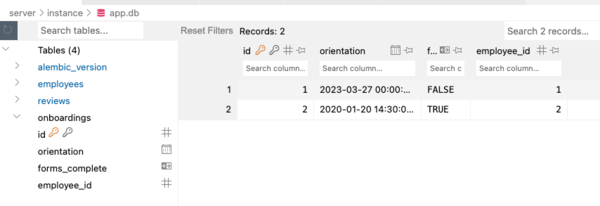
Now we can explore the one-to-one relationship using Flask shell.
Cascades
In most one-to-many relationships like we see with employees and reviews, we want to make sure that when the parent (Employee) disappears, the child (Review) does as well. SQLAlchemy handles this logic with cascades.
A cascade is a behavior of a SQLAlchemy relationship that carries from parents to children. All SQLAlchemy relationships have cascades. By default, a relationship's cascade behavior is set to 'save-update, merge'. This can be changed to any combination of a set of behaviors:
save-update: when an object is placed into a session withSession.add(), all objects associated with it should also be added to that same session.- If an employee is added to a session, all of its reviews will be as well.
merge: if the session contains duplicate objects,mergeeliminates those duplicates.- If an employee is merged to a session, its reviews that have already been added to the session will not be added again.
delete: when a parent is deleted, its children are deleted as well.- If an employee is deleted, its reviews will be deleted as well.
all: a combination ofsave-update,merge, anddelete.delete-orphan: when a child is disassociated from its parent, it is deleted.- If a review is removed from
employee.reviews, the review will be deleted.
- If a review is removed from
As we begin configuring our cascade, let's ask ourselves a few questions:
- Do we need reviews to be updated when their employee is updated?
- Do we need to avoid adding duplicate reviews to our session?
- Do we need to delete reviews when their employee is deleted?
- Do we need to delete reviews when they are no longer associated with an employee (i.e. orphaned)?
We know that we want reviews to be associated with their employees, so that's a "yes" to number 1. We also want to avoid adding duplicates to the session, so that's a "yes" to 2 as well.
Reviews are inherently linked to employees, so we should delete them if the employee no longer exists. That's a "yes" to number 3.
Since we are going to be using save-update, merge, and delete, we can start our cascade with all.
reviews = db.relationship('Review', back_populates="employee", cascade='all')
Lastly, for the same reason we included delete, we do want to delete reviews that are no longer associated with an employee. What good is a review of no one? Let's say "yes" to number 4 as well and finish our cascade:
reviews = db.relationship(
        'Review', back_populates="employee", cascade='all, delete-orphan')
Our database is now configured to delete reviews when their employee is deleted and when they are removed from their employee, or orphaned.
We can confirm this by deleting a review from an employee's list of reviews.
>>> Review.query.all()
[<Review 1, 2023, Great web developer!>, <Review 2, 2021, Good coding skills, often late to work>, <Review 3, 2022, Strong coding skills, takes long lunches>, <Review 4, 2023, Awesome coding skills, dedicated worker>]
>>> uri = Employee.query.filter_by(id = 1).first()
>>> uri.reviews
[<Review 1, 2023, Great web developer!>]
>>> # Remove review from list
>>> uri.reviews.pop()
<Review 1, 2023, Great web developer!>
>>> # Confirm review is removed from employee's list
>>> uri.reviews
[]
>>> # Confirm the review was deleted
>>> Review.query.all()
[<Review 2, 2021, Good coding skills, often late to work>, <Review 3, 2022, Strong coding skills, takes long lunches>, <Review 4, 2023, Awesome coding skills, dedicated worker>]
>>> # Commit the changes in the database
>>> db.session.add(uri)
>>> db.session.commit()
We probably want a similar cascade between Employee and Onboarding. Since an Onboarding instance is only useful when associated with an existing Employee.
onboarding = db.relationship(
        'Onboarding', uselist=False, back_populates='employee', cascade='all, delete-orphan')
Conclusion
In this lesson, we focused on the most common kind of relationship between two models: the one-to-many or has many/belongs to relationship.
We establish a bidirectional relationship between two models (one-to-many and many-to-one) by making the following updates:
- Add a foreign key column to the model on the "many" side to store the one-to-many relationship.
- Add a relationship to the model on the "one" side to reference a list of associated objects from the "many" side.
- Add a reciprocal relationship to the model on the "many" side and connect both relationships using the
back_populatesproperty.
We also saw how to implement a one-to-one or has one/belongs to relationship by using the useList=False parameter in the relationship on the "has one" side of the relationship.
With a solid understanding of how to connect tables using primary and foreign keys, we can take advantage of some helpful Flask-SQLAlchemy methods that make it much easier to build comprehensive database schemas and integrate them into our Flask applications.
Solution Code
# server/models.py

from flask_sqlalchemy import SQLAlchemy
from sqlalchemy import MetaData

metadata = MetaData(naming_convention={
    "fk": "fk_%(table_name)s_%(column_0_name)s_%(referred_table_name)s",
})

db = SQLAlchemy(metadata=metadata)

class Employee(db.Model):
    __tablename__ = 'employees'

    id = db.Column(db.Integer, primary_key=True)
    name = db.Column(db.String)
    hire_date = db.Column(db.Date)

    # Relationship mapping the employee to related reviews
    reviews = db.relationship(
        'Review', back_populates="employee", cascade='all, delete-orphan')

    # Relationship mapping employee to related onboarding
    onboarding = db.relationship(
        'Onboarding', uselist=False, back_populates='employee', cascade='all, delete-orphan')

    def __repr__(self):
        return f'<Employee {self.id}, {self.name}, {self.hire_date}>'

class Onboarding(db.Model):
    __tablename__ = 'onboardings'

    id = db.Column(db.Integer, primary_key=True)
    orientation = db.Column(db.DateTime)
    forms_complete = db.Column(db.Boolean, default=False)

    # Foreign key to store the employee id
    employee_id = db.Column(db.Integer, db.ForeignKey('employees.id'))

    # Relationship mapping onboarding to related employee
    employee = db.relationship('Employee', back_populates='onboarding')

    def __repr__(self):
        return f'<Onboarding {self.id}, {self.orientation}, {self.forms_complete}>'

class Review(db.Model):
    __tablename__ = 'reviews'

    id = db.Column(db.Integer, primary_key=True)
    year = db.Column(db.Integer)
    summary = db.Column(db.String)

    # Foreign key to store the employee id
    employee_id = db.Column(db.Integer, db.ForeignKey('employees.id'))

    # Relationship mapping the review to related employee
    employee = db.relationship('Employee', back_populates="reviews")

    def __repr__(self):
        return f'<Review {self.id}, {self.year}, {self.summary}>'
#!/usr/bin/env python3
# server/seed.py

import datetime
from app import app
from models import db, Employee, Review, Onboarding

with app.app_context():

    # Delete all rows in tables
    Employee.query.delete()
    Review.query.delete()
    Onboarding.query.delete()

    # Add model instances to database
    uri = Employee(name="Uri Lee", hire_date=datetime.datetime(2022, 5, 17))
    tristan = Employee(name="Tristan Tal",
                       hire_date=datetime.datetime(2020, 1, 30))
    db.session.add_all([uri, tristan])
    db.session.commit()

    # 1..many relationship between Employee and Review
    uri_2023 = Review(year=2023,
                      summary="Great web developer!",
                      employee=uri)
    tristan_2021 = Review(year=2021,
                          summary="Good coding skills, often late to work",
                          employee=tristan)
    tristan_2022 = Review(year=2022,
                          summary="Strong coding skills, takes long lunches",
                          employee=tristan)
    tristan_2023 = Review(year=2023,
                          summary="Awesome coding skills, dedicated worker",
                          employee=tristan)
    db.session.add_all([uri_2023, tristan_2021, tristan_2022, tristan_2023])
    db.session.commit()

    # 1..1 relationship between Employee and Onboarding
    uri_onboarding = Onboarding(
        orientation=datetime.datetime(2023, 3, 27),
        employee=uri)
    tristan_onboarding = Onboarding(
        orientation=datetime.datetime(2020, 1, 20, 14, 30),
        forms_complete=True,
        employee=tristan)
    db.session.add_all([uri_onboarding, tristan_onboarding])
    db.session.commit()