undefined
Chapter 13. User Comments
Allowing users to interact is key to the success of a social blogging platform. In this chapter, you will learn how to implement user comments. The techniques presented are generic enough to be directly applicable to a large number of socially enabled applications.
Database Representation of Comments
Comments are not very different from blog posts. Both have a body, an author, and a timestamp, and in this particular implementation both are written with Markdown syntax. Figure 13-1 shows a diagram of the comments table and its relationships with other tables in the database.
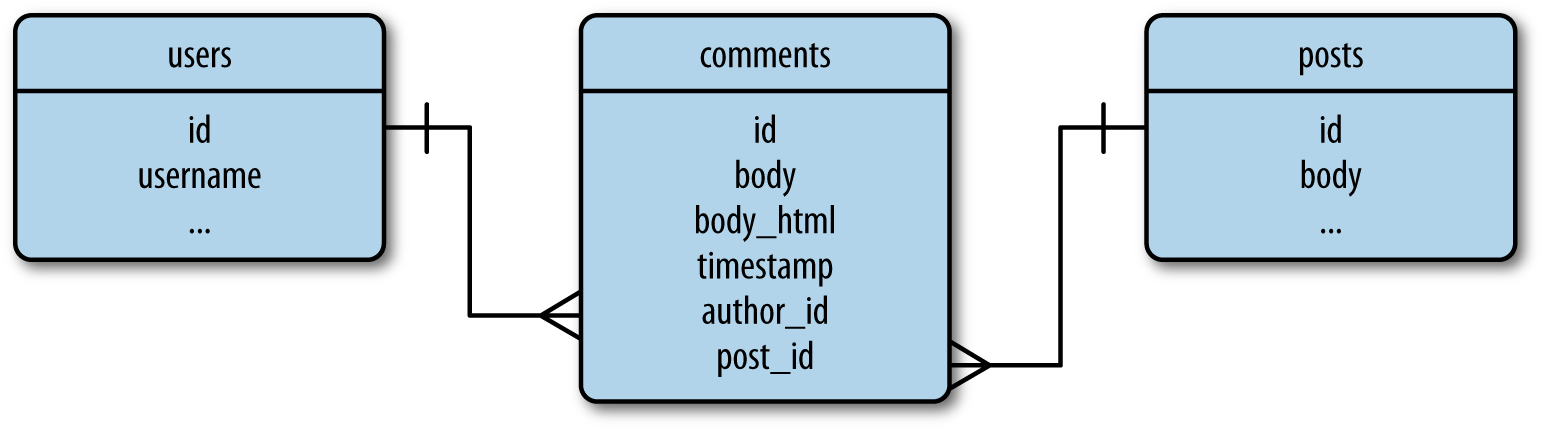
Database representation of blog post comments.
Comments apply to specific blog posts, so a one-to-many relationship from the posts table is defined. This relationship can be used to obtain the list of comments associated with a particular blog post.
The comments table is also in a one-to-many relationship with the users table. This relationship gives access to all the comments made by a user, and indirectly how many comments a user has written, a piece of information that can be interesting to show in user profile pages. The definition of the Comment model is shown in Example 13-1.
The attributes of the Comment model are almost the same as those of Post. One addition is the disabled field, a Boolean that will be used by moderators to suppress comments that are inappropriate or offensive. Like blog posts, comments define an event that triggers any time the body field changes, automating the rendering of the Markdown text to HTML. The process is identical to what was done for blog posts in Chapter 11, but since comments tend to be short, the list of HTML tags that are allowed in the conversion from Markdown is more restrictive, the paragraph-related tags have been removed, and only the character formatting tags are left.
To complete the database changes, the User and Post models must define the one-to-many relationships with the comments table, as shown in Example 13-2.
Example 13-2. app/models.py: one-to-many relationships from users and posts to comments
Comment Submission and Display
In this application, comments are displayed on the individual blog post pages that were added as permanent links in Chapter 11. A submission form is also included on these pages. Example 13-3 shows the web form that will be used to enter comments—an extremely simple form that only has a text field and a submit button.
Example 13-3. app/main/forms.py: comment input form
Example 13-4 shows the updated /post/int:id route with support for comments.
This view function instantiates the comment form and sends it to the post.html template for rendering. The logic that inserts a new comment when the form is submitted is similar to the handling of blog posts. As in the Post case, the author of the comment cannot be set directly to current_user because this is a context variable proxy object. The expression current_user._get_current_object() returns the actual User object.
The comments are sorted by their timestamp in chronological order, so new comments are always added at the bottom of the list. When a new comment is entered, the redirect that ends the request goes back to the same URL, but the url_for() function sets the page to -1, a special page number that is used to request the last page of comments so that the comment just entered is seen on the page. When the page number is obtained from the query string and found to be -1, a calculation with the number of comments and the page size is done to obtain the actual page number to use.
The list of comments associated with the post is obtained through the post.comments one-to-many relationship, sorted by comment timestamp, and paginated with the same techniques used for blog posts. The comments and the pagination object are sent to the template for rendering. The FLASKY_COMMENTS_PER_PAGE configuration variable is added to config.py to control the size of each page of comments.
The comment rendering is defined in a new template, _ comments.html, that is similar to _posts.html but uses a different set of CSS classes. This template is included by _posts.html below the body of the post, followed by a call to the pagination macro. You can review the changes to the templates in the application’s GitHub repository.
To complete this feature, blog posts shown on the home and profile pages need links to the pages with the comments. This is shown in Example 13-5.
Note how the text of the link includes the number of comments, which is easily obtained from the one-to-many relationship between the posts and comments tables using SQLAlchemy’s count() filter.
Also of interest is the structure of the link to the comments page, which is built as the permanent link for the post with a #comments suffix added. This last part is called a URL fragment and is used to indicate an initial scroll position for the page. The web browser looks for an element with the id given and scrolls the page so that element appears at the top of the page. This initial position is set to the “Comments” heading in the post.html template, which is written as <h4 id="comments">Comments</h4>. Figure 13-2 shows how the comments appear on the page.
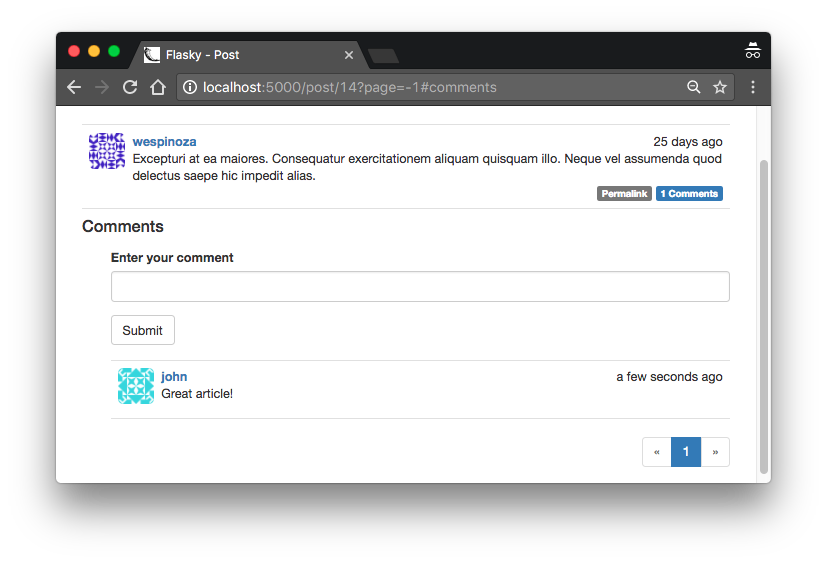
Blog post comments
An additional change was made to the pagination macro. The pagination links for comments also need the #comments fragment added, so a fragment argument was added to the macro and passed in the macro invocation from the post.html template.
Tip
If you have cloned the application’s Git repository on GitHub, you can run git checkout 13a to check out this version of the application. This update contains a database migration, so remember to run flask db upgrade after you check out the code.
Comment Moderation
In Chapter 9 a list of user roles was defined, each with a list of permissions. One of the permissions was Permission.MODERATE, which gives users who have it in their roles the power to moderate comments made by others.
This feature will be exposed as a link in the navigation bar that appears only to users who are permitted to use it. This is done in the base.html template using a conditional, as shown in Example 13-6.
The moderation page shows the comments for all the posts in the same list, with the most recent comments shown first. Below each comment is a button that can toggle the disabled attribute. The /moderate route is shown in Example 13-7.
This is a very simple function that reads a page of comments from the database and passes them on to a template for rendering. Along with the comments, the template receives the pagination object and the current page number.
The moderate.html template, shown in Example 13-8, is also simple because it relies on the _comments.html subtemplate created earlier for the rendering of the comments.
This template defers the rendering of the comments to the _comments.html template, but before it hands control to the subordinate template it uses Jinja2’s set directive to define a moderate template variable set to True. This variable is used by the _comments.html template to determine whether the moderation features need to be rendered.
The portion of the _comments.html template that renders the body of each comment needs to be modified in two ways. For regular users (when the moderate variable is not set), any comments that are marked as disabled should be suppressed. For moderators (when moderate is set to True), the body of the comment must be rendered regardless of the disabled state, and below the body a button should be included to toggle the state. Example 13-9 shows these changes.
With these changes, users will see a short notice for disabled comments. Moderators will see both the notice and the comment body. Moderators will also see a button to toggle the disabled state below each comment. The button invokes one of two new routes, depending on which of the two possible states the comment is changing to.Example 13-10 shows how these routes are defined.
The comment enable and disable routes load the comment object, set the disabled field to the proper value, and write it back to the database. At the end, they redirect back to the comment moderation page (shown in Figure 13-3), and if a page argument was given in the query string, they include it in the redirect. The buttons in the _comments.html template are rendered with the page argument so that the redirect brings the user back to the same page.
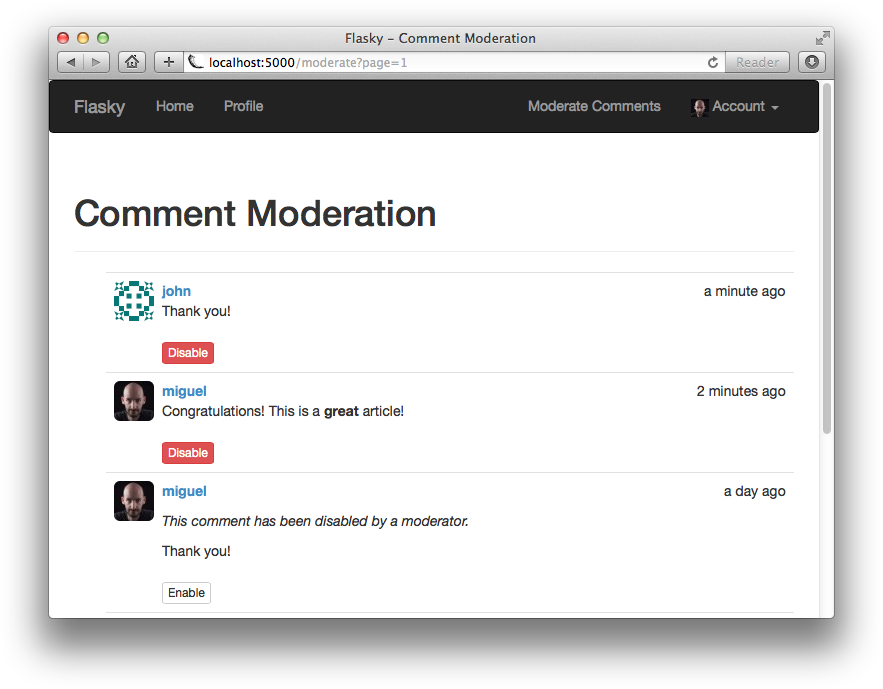
Comment moderation page.
Tip
If you have cloned the application’s Git repository on GitHub, you can run git checkout 13b to check out this version of the application.
The topic of social features is completed with this chapter. In the next chapter, you will learn how to expose the application functionality as an API that clients such as smartphone apps can use.
Table of contents collapsed