Intro to Deployment: Software Engineering 13 Phase 4 Hybrid
Learning Goals
- Understand what "deploying" means.
- Understand the responsibilities of a web server.
- Evaluate platforms for deploying Flask applications.
- Repo.
Key Vocab
- Deployment: the processes that make an application available for its intended use. For web applications, this means moving the application to a platform that supports requests from the internet.
- Developer Operations (DevOps): the practices and tools that improve a team's ability to develop and deploy applications quickly.
- PostgreSQL: an open-source relational database system that provides more SQL functionality than SQLite. Unlike SQLite, its data is stored on a server rather than in files.
- Platform as a Service (PaaS): a development and deployment platform that exists on a wide range of servers with different functionality. PaaS solutions reduce maintenance time for a software development team, but can increase cost. Some PaaS solutions, such as Render, provide free tiers for small applications.
Introduction
So far during this phase, we've been working on developing applications and running them locally on our own computers. If we want other folks to be able to interact with our applications, that means we need to deploy them to another computer that's configured to allow requests over the internet, from anywhere in the world!
This process essentially involves:
- taking our application's code...
- uploading it to a server that's configured to run our code and allow HTTP requests...
- and running our code on that server.
As a web developer, it's essential to familiarize yourself with the deployment process for a few reasons:
- It's increasingly expected that developers participate in the deployment process. While many companies employ specialized DevOps (Developer Operations) engineers, it is not uncommon for engineers on other teams to have a hand in deploying and troubleshooting issues in production.
- Deploying your site early in the development process can be helpful for catching bugs that you may not encounter running your code locally, particularly when it comes to project dependencies and working with third-party services.
- Understanding how your app will perform in different environments (development and production) can help you optimize your code's performance.
In this lesson, we'll explore the deploying process and identify the things a web server needs in order to host a Flask application.
Defining a Web Server
All web servers share the same common goal: they must be able to handle HTTP requests, and send back a response. The simplest kind of websites are known as static websites Links to an external site., which typically means sites that store all their content in pre-built HTML, JavaScript and CSS files that are saved to the file system and sent back when a client makes a request for that specific file:

Static websites are still quite common on the web; but there's also a large portion of the web that is dynamic Links to an external site.. With dynamic pages, the content returned from an HTTP request isn't derived from just an HTML file, but instead is processed by some code running on the server before it's sent back to the client. All Flask applications are dynamic, since every request needs to be processed by Flask in order to determine the correct response.
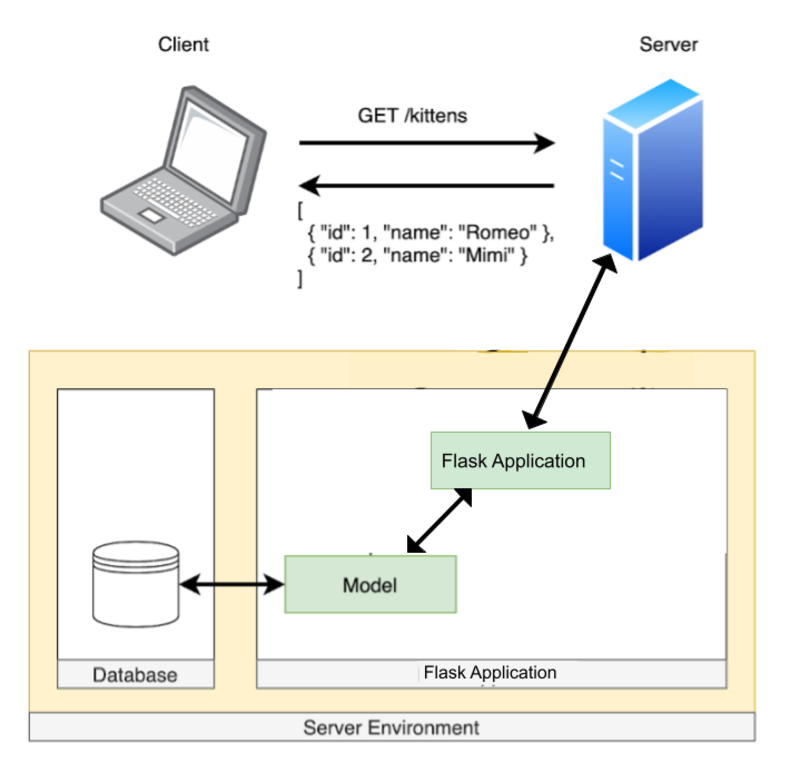
Since hosting a server for dynamic websites is a bit more complicated, let's discuss some things a dynamic server needs in order to do its job.
Application Environment
One big consideration for developing any application is: what environments does the application need to run in?
Broadly speaking, application environments are split into three categories:
- Development: When you're working on your application locally, running the code on your personal computer, it's running in the development environment. In a development environment, you should be able to easily use debugging tools (like
ipdb), and code analysis tools (like ESLint, which warns you when you're using React incorrectly). You should be able to quickly see the result of adding new code and how that affects your application. - Testing: When your test runner (like pytest or Jest) is running, it runs in a testing environment. In this environment, your code should run as quickly as possible so that you can get rapid feedback on your application by running your test suite. It should also be as close as possible to your production environment (though this comes with tradeoffs related to how quickly your tests can run).
- Production: When your application is deployed to a server, it will be running in a production environment. Some features you have available in the development environment, like debugging tools and hot-reloading when code changes, aren't available in this environment. Instead, the focuses of a production environment are to run your application quickly; be resilient to errors (and to keep a log of what goes wrong); to handle lots of traffic; and generally to make your application as great as it can be for your users.
Other environments you may use when building an application are a QA (quality assurance, for manual testing of features) environment and a staging environment (a preview of the production environment, usually used as the last stage before deploying a new feature). These are standard for larger teams.
Take a moment to think about all the things that are required to run a Flask application in your local development environment. When you're working on a lab, what setup is needed so that you can type python app.py in the terminal, and view your website in the browser?
For starters, there's your environment setup: you could be running on OSX, or WSL, or Linux; you'll need to have a recent version of Python installed; you'll need Git for version control; and a few other system dependencies.
There are also all of your application dependencies: the code specific to your Flask app that needs to run. That includes the Flask library itself as well as all the other libraries in your Pipfile.
You'll also need some kind of database to persist all your data. It's helpful to think of the database in isolation from the rest of your application, as a kind of resource that's available to your Flask app; ideally, even if your Flask app goes down for some reason, your database shouldn't go down with it!
A note on databases: for the labs in this phase, we've been using SQLite as a lightweight database. It's great for quick development, but it doesn't scale well to larger applications. We'll be using PostgreSQL for our database moving forward. More on that later!
Since all of these elements are required in order to run our application, whatever system we choose to deploy our code on will need to be able to handle a similar environment setup. Let's explore some options.
Deploying Options
When it comes to deciding which platform to use to host our deployed applications, there are a number of options, each of which comes with some tradeoffs. For Flask in particular, a few popular choices are:
- Heroku Links to an external site.
- Amazon Web Services (AWS) Links to an external site.
- Digital Ocean Links to an external site.
- Render Links to an external site.
One thing these services all have in common: they all have the ability to easily configure an environment to run our Flask applications in. These services own the hardware (the physical servers and networking infrastructure) that your code will run on, but they also have configurable containers Links to an external site. with resources dedicated to run your code.
These containers are what makes it possible to quickly and easily set up a new production environment that has all the functionality needed to run your site:
- OS: Typically Linux. Applications like Flask work well across platforms, so even if you're using a different OS in development, deploying to a server that runs Linux works just fine!
- Python: You should use the exact same version of Python in development and in production. Since new Python versions have new features, as well as fixing security issues in older versions, it's critical to use the same version in both environments.
- NodeJS: It's important to use the same NodeJS version in both environments for the same reasons listed for Python.
- Database: While it's possible to use different databases in a development and production environment, it's generally not a good idea to do so: there are some differences in how (for example) SQLite and PostgreSQL interpret different SQL commands and what features are available in both, so it's considered a best practice to use the same database in development and in production.
There are a lot of considerations when it comes to choosing a platform for deploying your application, such as:
- Cost: How much will this platform charge me? How much do I get for free? Flat rate per month? Calculated based on usage?
- Ease of use: How much work does it take to deploy my application the first time? How easy is it to deploy new versions?
- Scalability: As my application gets more users, how easy is it to handle increased traffic?
- Performance: Does my application need to handle a lot of traffic? Be optimized for video processing? Store a lot of files? Handle large database tables?
For now, since we're deploying our very first Flask projects, we're going to prioritize cost and ease of use to decide on a platform, and use Render for deploying in the coming lessons.
Render Links to an external site. is first and foremost a Platform as a Service (PaaS), which means they manage the hardware your code runs on as well as the software environment, with an aim of making it as simple as possible to take the code from your machine and run it on theirs. Render also has a free tier for developers to try out the service at no cost.
, AWS's Elastic Beanstalk Links to an external site. and Digital Ocean's App Platform Links to an external site. are also Platform as a Service options as well, so you're welcome to try them out for future projects if you're interested in exploring other options.
The downside to PaaS options is that they tend to cost more in the long run as your application scales up, since you're not only paying for the hardware your code runs on, you're also paying for the platform maintenance and security. They also tend to make it more challenging to fine-tune the environment in a way that is optimal for your specific application, rather than all applications running on their service.
The upside is that compared to handling that configuration ourselves, using Render will make it much easier to get our app up and running in a production environment on a server.
Conclusion
The end goal of developing web applications is to share them with the world, and deploying is the crucial last step in this process! As a developer, it's important to equip yourself with the knowledge of what it takes to deploy a website so you can evaluate the available options and choose the right one for your project.
In the coming lessons, we'll go through that deployment process with a couple of applications of varying complexity so you can build the confidence to deploy your own projects independently.
Check For Understanding
Before you move on, make sure you can answer the following questions:
How does having an understanding of the deployment process help you as a developer?
Deployment is necessary to make applications available to users.
As fun as local development and seed data can be, they do not allow others to use your product and view data that reflects its use.
What are the advantages and disadvantages of using a Platform as a Service (PaaS) to deploy a Flask app?